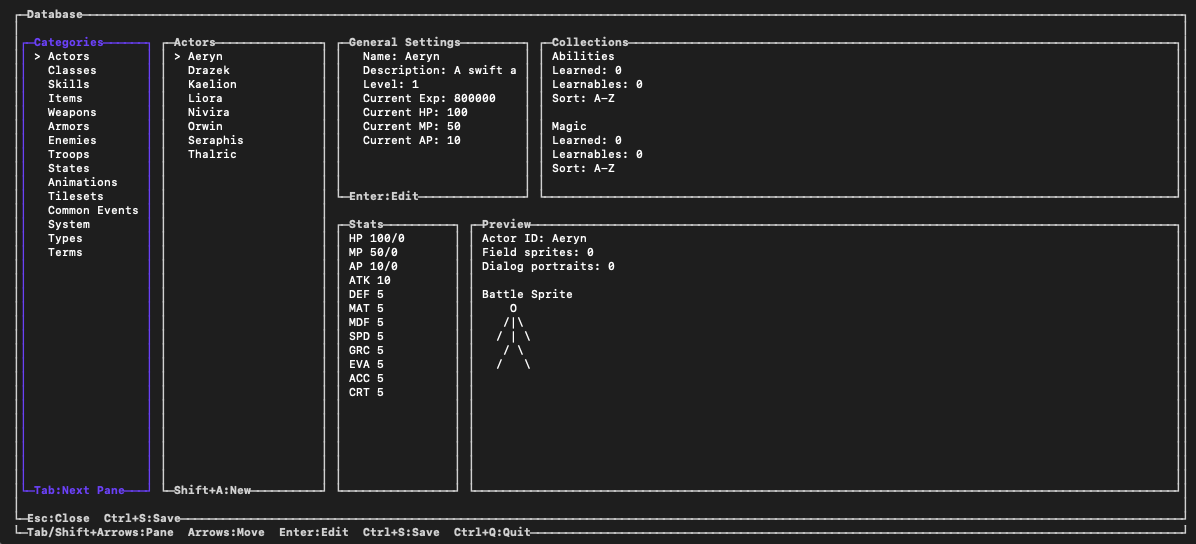
Open the Editor from the root of the game project:
ichiloto editThe database workspace brings the systems that define the game into one authoring surface. Depending on the project, that includes actors, classes, items, equipment, enemies, skills, quests, knowledge, event commands, achievements, and project policy.
Author relationships, not isolated records
An RPG database is a web of references. An actor uses a class and equipment; a troop uses enemies; a skill carries effects and resource costs; a quest listens for progress in the world. When changing one record, check the systems that name it rather than treating the edit as a local form change.
Use the Editor's contextual pickers where they are available. They reduce spelling mistakes and keep authored references tied to records the project can actually load.
Treat identity as permanent
Display names can change. Persistent identities should not.
Once an actor, item, quest, map, skill, or other saved record has shipped, keep
its identity stable. If it must be renamed or removed, describe that transition
in assets/Data/save-compatibility.php with an alias or tombstone. Reusing the
old identity for unrelated content can make an existing save point at the wrong
thing.
Preserve project-owned source
Ichiloto data may be authored in PHP, so the surrounding source remains part of the project. Database edits are designed to update the selected record while preserving unrelated code and coordinating records that share a file.
Review source-control diffs after a database session. A focused edit should produce a focused diff, which makes balancing changes and content reviews much easier to understand.
Validate after structural changes
Run validation after adding, renaming, or removing connected records:
ichiloto validateValidation checks project-wide references and identity conflicts that may not appear until a distant map, event, save, or battle loads. Fix errors first, then review warnings in the context of the design you intended.